
Kepler Attack is a retro space shooter that I made exclusively for the Apple Watch.
If you have an Apple Watch then you can get it here from the App Store.
Kepler Attack Game Footage
Why Apple Watch?
As my friends know, I am a huge Apple Watch fan. I've had a Watch since day one and I've made a number of games for the platform. All of these games are simple puzzle games - not the sort of games you would use to show off your Apple Watch to your friends.So I figured it was about time the Watch had such a game!
And this, dear reader, is why I created Kepler Attack.
Have I succeeded in creating a killer Watch game? Time will tell, but I think I've done a pretty good job in making something I can be proud of.
Origins
I started Kepler Attack on the 15th October 2018 and used art assets from my Ultra Dash game. The Watch app was part of the Ultra Dash project and my initial plan was to mimic that games mechanic, which involved racing through space avoiding obstacles.You can read about the making of Ultra Dash here.
Controls
I explored a number of ways to control the player ship. I tried tapping the screen to move the ship left and right but this didn't work. It was slow and your finger obscured the action. Buttons weren't viable as the screen was too small to accommodate them.As soon as I added the Digital Crown controls it was obvious that this was the right choice. Using the Crown as the controller led to the next logical change - making the the ship move in a circular motion, not just left and right.
On the 4th of November I split out the Watch game to be its own project, removing it from Ultra Dash.
Art
For Ultra Dash I wanted to make the art myself. In my making of blog post for that game I wrote:One of my hopes for Ultra Dash is that it has the chance to find an audience. I am a bit worried that the art may impact on that chance. Anecdotally any screen shot of Ultra Dash I tweeted would get around 0 favourites while a beautiful 3D Billy Carts screen shots could get up to 20 favourites. People like beautiful games.Well, I was right. People do like beautiful games. And my art was programmer art. But hey, I got to do the art for the game - even if it didn't set the world on fire.
This isn't a surprising revelation, but it's easy for people to forget this simple fact.
So for Kepler I listened to the feedback and contacted my good friend and amazing artist Pete Mullins to replace my placeholder art with something good.
Space Ship Design
I created the placeholder art in Affinity Designer and played with their sizes to get the hero and enemy ships to look good on the small Watch screen before getting Pete to redo it. This way I could make sure I had the required number of ships and their sizes locked down.
 |
| My placeholder ship art |
Pete and I discussed how the final ships should look. I gathered a bunch of reference material for old vector style graphics from the likes of Asteroid and Tempest, as well as the blocky sprite stylings of arcade shooters.
 |
| Final art inspired by classic eighties arcade space shooters |
The old school pixel look won out and Pete began creating some cool looking ship designs.
As well as the ships, we updated the asteroids, power ups and projectiles. We also added a new blocky pixel inspired font. The game was playing really well with super smooth controls and it looked the part.
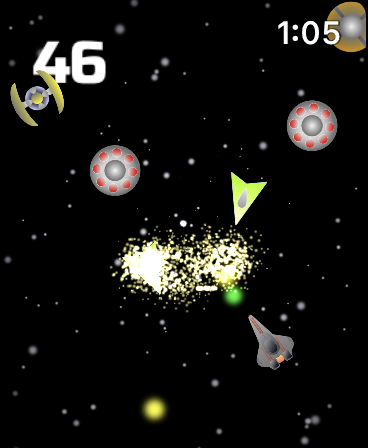 |
| Programmer Art |
 |
| Final Art by Pete Mullins |
Logo Design
I wanted the logo to capture the spirit of the classic eighties games like Galaxian and Galaga.
I mocked up the first attempt at a logo which served well as a placeholder piece.
The final logo designed by Pete managed to capture the eighties arcade vibe while still feeling fresh. Importantly it also looked great on the small Watch face.
 |
| Classic arcade game logos |
I mocked up the first attempt at a logo which served well as a placeholder piece.
 |
| My initial attempts at a logo |
The final logo designed by Pete managed to capture the eighties arcade vibe while still feeling fresh. Importantly it also looked great on the small Watch face.
 |
| The final logo by Pete Mullins |
Coding
I built the game with Xcode 10 using Swift 5 and the SpriteKit framework.
I used a storyboard to lay out the main menu in Xcode. Creating UI for the Watch is surprisingly easy using a combination of vertical and horizontal groups that can be stacked. I only used one screen with the menu and game screen sharing this space. The game screen (a SpriteKit Scene) is initially hidden from view.
 |
| Xcode menu storyboard |
When the player taps to start playing I hide the menu group and show the SpriteKit Scene. This made it easier to transition to the game scene from the menu and not inherit all of the Watch UI that would have appeared, like the back button.
I laid out the game scene in the Sprite Kit Scene editor.
 |
| The scene editor for the game screen |
I placed the hero ship and score and UI labels here, and programatically generated the enemies and asteroids.
Enemies
I used a lot of built in features of Xcode and Swift to make the game. Xcode has a simple particle emitter editor so I created the star field with this. The stars are an emitter at the centre of screen that spawns various sized blue squares that shoot off in different directions at different speeds.
For the enemy attack patterns I used Swift's bezier path function. With this I simply had to pick a number of random points on screen and plot a bezier curve through them. Super easy and it looks great!
// create a bezier path that defines our curve
let path = UIBezierPath()
// Start position
path.move(to: startPosList.randomElement()!)
path.addQuadCurve(to: arcPosList.randomElement()!,
controlPoint: arcPosList.randomElement()!)
Then I attached the paths to the enemy ships and started them on their merry way.
enemy.sprite.run( SKAction.repeatForever(
SKAction.sequence([
SKAction.wait(forDuration: duration),
SKAction.follow(path.cgPath,
asOffset: false,
orientToPath: true,
speed: 150.0)
])),
withKey: "path"
)
SpriteKit actions are a really powerful part of SpriteKit. As you can see above, you can run a set of actions on your sprite. There are a whole bunch of useful action methods that when chained together create some pretty cool movement sequences.
Actions let you follow paths, fade, scale your sprite on the x and y axis, wait for set time durations, move the sprite set amounts or to specific locations - you can add these inside fixed, single and repeating loops - and you can also call your own functions from within.
The majority of the hero, enemy and obstacle sprite logic was built with SKActions.
User Testing
Once I had a playable build I used TestFlight and the public beta link system to open up the game to external testers. I did a call out on my social media and posted on the TouchArcade forums. From these two sources I got a reasonably sized testing group to get some good feedback.
I would make changes and push out new builds, polishing the game until I was happy.
At the end of March 2019, I submitted Kepler Attack to the App Store as a pre-order and set the release date for 6 weeks in the future. Now it was time to get the word out...
Pricing
I set the price to 99c (Tier 1). I toyed with a higher price point but wanted to capture the arcade feel that inspired the game, and 99c felt like the right amount to charge for it.
Going free to play was out of the question as there is no way to serve ads or offer IAP on the Watch. Will users pay 99c for a game any more? I'll soon find out...
Marketing
Analysts calculated that there were around 45 million Apple Watches shipped in 2018. The Watch isn't the most obvious gaming platform, but I believe that a small percentage of owners would surely be interested in playing a game on their wrist. And even a small percentage of 45 million is quite a large number of potential players for an indie game developer!My biggest challenge will be reaching those users, but I have a number of ideas on how to do this and will try a mixture of paid ads and boosted promotions on sites like Facebook and Instagram.
The Future
Right now I'm focused on getting the word out to those people who own Apple Watches. As mentioned above, they are a tough market to connect with. I'm hoping that if they can be made aware of my little game then they may want to buy it. It is the perfect game to idle away the time between meetings and waiting in line.
I have an update ready to release within a few weeks of initial launch. This new update adds a Top 100 leaderboard which is accessible right on the Watch. This is a really fun feature and adds a lot to the game.
My fingers are crossed that it does find an audience, but whatever the outcome, I can honestly say that I've made one of the best Apple Watch games you can play.
And I had fun doing it!
- Johnno
My fingers are crossed that it does find an audience, but whatever the outcome, I can honestly say that I've made one of the best Apple Watch games you can play.
And I had fun doing it!
- Johnno
Development Environment
IDE: Xcode 10Language: Swift 5 with SpriteKit
Tools
Programmer Art - placeholder art was made with Affinity DesignerFinal Art - produced by Pete Mullins using Photo Shop
Icon Creator - Asset Catalog Creator
Screen Shots - Screenshot Creator Pro
Version Control - Source Tree and Bitbucket
Tasks - Trello to keep a list of To Do, Doing and Done tasks as well as backlog for future updates
Design and Code: John Passfield
Art: Pete Mullins


 Posts
Posts


