Saturday, February 10, 2018

Billy Carts Track Manager

I'm working on the game part-time so progress has been a little slow.

I've also been switching between Swift and C# which I find slows me down. There's enough difference between developing in Xcode with Swift and Unity with C# that I often find myself having to google how to do things. With Skip and Save done and dusted I am now focusing 100% on just Unity and C# so hopefully my brain will be able to store Unity/C# and not have to swap it out with Xcode/Swift :-)

I've recently been working on the track manager which lets the player race around an endless world in any direction. Previously the game was a single road down hill runner. While that was fun, it didn't offer enough of a point of difference to other games out in the market - and as a designer the idea of an endless world to explore offers so many more possibilities.

Currently the track uses a 3x3 grid of prefabs which rearrange themselves around the player so there is always an adjacent track.

Here is how it works from up high:
Endless Track Generator

Here's how it looks in game:

Endless driving (still with pop in)


At the moment the new track pieces are randomly placed so the scenery can suddenly change to a different track layout which is disconcerting - and there's also noticeable pop in when new tracks appear out front. The idea was to get something in fast to test the concept.

Now that it works, the next step is to make sure that the "infinite" track layout is generated procedurally but in a way that the tracks connect logically so the scenery flows from outback to forest to townships.

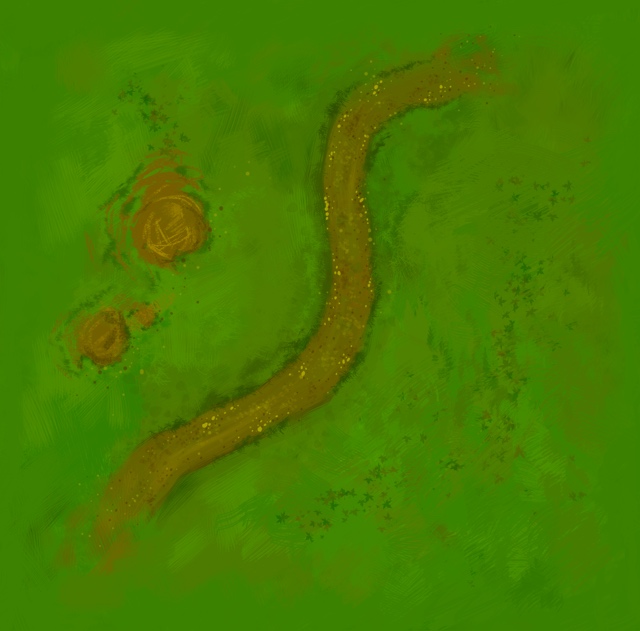
At the moment I'm using 3 track tiles that Pete has provided for testing:


Track 1

Track 2

Track 3

There will be different themed pieces and of course content that fits on each piece like houses, dunnies (Aussie outdoor toilets), old car wrecks, animals, fences and all manner of obstacle and collectable.

This is an Australian themed game and I'm really excited about the assets Pete will be creating to make this a truly Aussie experience. One of the things I'm keen on doing is injecting humour into the game through the characters, animals and landscape. Pete and I both worked on TY the Tasmanian Tiger (I co-created TY) and we also did an Aussie comic strip together called Dingo Boy - so we're no strangers to creating Aussie content.

I look forward to sharing more soon!

- Johnno

Friday, February 02, 2018

Apps versus Games

At the end of last year I took some time out from making games to try my hand at developing my first app. The app is Skip and Save and was designed with the Apple Watch in mind, but also works on the iPhone and iPad.

I designed Skip and Save with the Watch in mind

Creating this app was a new experience for me. And for the most part it was an enjoyable one.

I completed the app at the start of December 2017 and submitted it to Apple with a release date of 24th of January - roughly 8 weeks before launch so I had the best possible chance of being considered for Apple featuring. Apple recommends giving them 6-8 weeks notice and if you’re a developer I highly recommend you do this too - more details here:
https://developer.apple.com//contact/app-store/promote/

I built Skip and Save, which is a saving app, primarily for my use. As I mentioned in a previous "making of" blog post, I often skip a treat and “bank” the money putting it toward buying something else later on - like a book or game. Regardless of the financial success of the app this was something I wanted to use and I figured I could also release it for others to enjoy.

So how does making and releasing an app compare to making and releasing a game?

Making the App

I enjoyed building the app just as much as building a game. It was a challenge to learn new stuff like how the UI system works and how the Watch handles complications. It was also a challenge to use storyboard in Xcode to make my app responsive to  different layouts and device sizes. I’ve used XAML before and found it much easier to create UI layouts. This is something I hope Apple can improve on in the future. For any Unity developers I can tell you it's easier to create responsive UI in Unity than Xcode!

Building the Watch component of the app was also much easier than the iPhone component. I figure this is due to the maturity of the WatchOS side of things. The Watch app took 25% of the total development time.


Marketing the App

Where apps depart dramatically from games is in the release/marketing phase. I had to find out which sites cover apps and the best app press release services. I did a lot of research and consumed a lot of App developer podcasts for best practices.

I reached out to sites that featured Watch and iOS apps with press info and pre-release promo codes. I also promoted the app leading up to it’s launch using the new Pre Order scheme on the App Store.

Sadly, on launch day, I got zero press interest and no featuring. Brian Mueller, the developer of Carrot, recently tweeted this:
"CARROT To-Do got 26 downloads and zero press coverage on launch day."
So I guess a lot hasn't changed in the last five years.

In my experience the App news sites are a lot tougher to crack then the game sites. My press release did seem to reach the far corners of the web though, as I received many emails from marketing folks offering to “promote” my app for a fee!

Apps are Different to Games

Here is where I think apps diverge in a BIG way from games.

With games you are solving a specific problem.

Players want to be entertained.

With a game, regardless of its genre, art style, team pedigree or core mechanic, your title has the potential to solve that problem. Your game simply has to entertain people!

With an app you’re solving a specific problem. This means you’re only appealing to those people that have that problem.

Skip and Save's market is people who are interested in saving money, and in a very specific way. So the potential market is a niche audience.

People don’t think “I need a new app, here’s a free one I’ll download it and give it a try!”

They think, “I need a better photo sharing app, let’s see what’s available.”

From my own experience with games, I tend to download a lot each week in different genres and from different developers because I want to have fun. And any game has the potential to scratch that itch.

This is obvious in hindsight, and as I mentioned I was making this app regardless as it’s an app that I wanted to use. But I do feel for my fellow non-game developers. They have it tough!

Will I make another app? I think I will. I have some problems that are specific to me that I want to solve. Only this time I'll focus on the Watch and not worry about the iPhone/iPad version - so this will drastically reduce development time. The Watch is how I use Skip and Save and the Watch is probably how I will use my future apps.

But for now I have a game to make :-)

- Johnno

Wednesday, January 24, 2018

Skip and Save launch

Today my first non-game app, Skip and Save, launched on the App Store.
You can download it from the App Store here.

To be honest, I have no idea how it will fair, or if anyone will be able to find it. I did a lot of research into app marketing - I followed sites that review apps, listened to app developer and app marketing podcasts and tried to understand the app market place. But it's still a new world for me and quite different to games.

Making the app was a lot of fun, so I would love for it to have some success to give me encouragement to make more apps. We'll have to wait and see how it goes. Expect a blog post on how the market perceived it in a month or two :-)

In the meantime, Pete and I are making progress on Billy Carts. I've been reworking the Track Manager code that builds the world around the player as they travel in whatever direction they choose. Will post some more screen shots soon!

- Johnno

Tuesday, January 16, 2018

Billy Carts (Back on Track Part 2)

Last year I wrote that I had finally wrapped development on my Ultra Dash game and was diving back into Billy Carts.

Well, a few other things popped up and in the time between then and now I made a new iPhone/Apple Watch app and put together a major update for Ultra Dash while Billy Carts languished...

Skip and Save is my Apple Watch app and will be coming out the 24th of January. It's an app that lets you track skipping treats to help you save for something special. You can pre-order it now by clicking this link. You can also read my blog post about making the app here.

Ultra Dash is an arcade endless runner I wrote in Swift. The game didn't set the world on fire, but I felt like there's something fun in the game so I wanted to do one last update to see if it can find it's audience. The update will be out in February.

Now, with all that out of the way, I can honestly say that Pete and I are back on track with Billy Carts!

So, what is Billy Carts you ask?

Well, it started out well over a year ago as a down hill endless racer, inspired by Faily Brakes. It's our first Unity game together (though not our first game as Pete and I had previously worked on TY the Tasmanian Tiger, Flight of the Amazon Queen and other games in the past) and we wanted to make something fun and distinctly Australian.

But now that we've had some time away from it (and with an improvement in my Unity skills and confidence) we've decided to change the game play a bit while still retaining the unique Aussie theme and racing elements.

So with the start of the new year Pete and I have ripped the game apart and reset it to make it something a bit more unique. My goal is to share our process of building the game and to do more frequent and smaller blog posts to show off our progress.

The first thing we've done is to change the environment from an endless down hill runner into an endless open world explorer. Previously the game created a series end to end tracks that appeared in front of the player - now we're using a 3x3 grid of square titles to create an open space that reforms around you as you race around the world.

First pass of 3x3 grid that is built around the player.
And this is how it looks in game. There are no props yet - I took out the trees, rocks, etc. to focus on the track generation.

Open world with new skybox.
One thing I want to do is to try out new stuff as we build the game, so the design is fairly light on. It's procedural and you collect stuff while avoiding obstacles and rack up a score - but what else can be done to make it feel great? This is what I aim to find out. I'm sure there will be a lot of missteps and travelling down the wrong path, but that's the fun of making games, right?

As well as the development work-in-progress updates I'd also like to talk about some of the decisions we've made in developing the game. In particular the Australian aspect of the game. As I mentioned both Pete and I worked on the TY series (I co-created, designed and wrote the script) and I have an affinity for making Aussie games. I feel like there is so much richness to explore, but I've only made two Aussie games and want to make more. This is something I'd love to talk more about.

I hope you'll join Pete and I as we try and make a fun game!

- Johnno


Sunday, December 03, 2017

A New Watch App

[UPDATE: You can pre-order/download Skip and Save here - https://itunes.apple.com/au/app/skip-and-save/id1318698486?mt=8]

I upgraded from my 3 year old Series 0 Apple Watch to the new Series 3 with LTE and I love it. Having worn the original Watch for the last 3 years I've noticed huge improvements in speed and accuracy (especially Siri) with the new model. The heart rate sensor has improved, the battery life is amazing even when it gets a hammering from workouts and phone calls.

Anyway, I was so smitten I had to make something for it.

As I've mentioned before I'm developing all my games in Unity from now on. It makes sense as a) I can go multi-platform, b) there is so much more support/tutorials/help available for Unity and c) it makes 3D development so much easier.

But an app is different to a game, so I feel I'm technically not breaking my promise to myself to focus on Unity for game development :-)

So what is this app? It's called Skip and Save and comes out of my habit of giving up the occasional treat and making a mental note that I just saved money in order to buy something else at a later date. I know, it's a dodgy way of budgeting, but it works for me.

I figured this would be a good process to make into an app and it seemed perfect for the Watch where the ideal apps are very limited interactions that take no more than a few seconds.

Building the Watch App
The Watch app development environment in Xcode is really nice. And laying out an app is super easy - so much easier than laying out an iPhone app as I would later discover.

You know have the ability to mix SpriteKit and SceneKit with regular screens. I used this to add ticker tape particle effects when you successfully skip and save money, and cool firework effects when you reach your goal.

I wanted to use as much of the Watch as I could, so I added in Siri voice recognition, Scribble support and support for all the different complications that the Watch has. I also made sure that the Watch could communicate back and forth with the iPhone version.

An early Watch build with a bar to show progress,

An updated version with a ring to show progress.

The first version of the app used force touch to access the options to setup your savings targets and to reset progress or undo a skip. From my own experience with other Watch apps I found this to be very unintuitive and often hid away key features. So I tried having a paged app that the user could swipe to  other pages to see more commands. This didn't feel good in practice either.

The final look of the Watch app. A single screen.

I settled on having a single screen app with buttons on screen to show more options to set targets, undo skips and reset progress and another information button to quickly see your targets.

I also tried out a number of images for the buttons and settled on a mixture of my own designs and those from the Font Awesome 5 set.

Building the iPhone App
As much as I love my Watch, the reality is the market for Watch only apps is still fairly small, so I needed to make an iPhone companion app. So I began the fun task of using Xcode and interface builder to create the app.

Storyboards for Watch apps are awesome. The way stack panels work is great, and you can overlay controls and even add a SpriteKit/SceneKit scene under a view - which lets you create some great layouts that can do awesome stuff in a simple and intuitive way.

The iPhone version is a little more complicated. I couldn't mix SpriteKit and standard views so had to rely on Core Animation to create the effects I had previously done in SpriteKit. So the knowledge I had from making games sadly couldn't be applied which meant I spent time having to learn new systems.

I also found creating responsive views a lot more complicated than in WatchKit and struggled with simple things like making my stack view contents remain at a fixed size. I'd end up with a mess of constraints that I would have to delete and start over again. Luckily RayWenderlich.com released a Udemy version of their training videos which included sections covering the very stuff I was struggling with - like stack views and how to use keyboards with scroll views.

One thing I did do with the iPhone app was to use vector images instead of pngs. They worked out really well, so I went back and updated the Watch to use vectors as well.

The original iPhone app had a light design.
Original iPhone design


I asked for some feedback on social media and got some great advice. Brent Helsop, a local developer gave me some great feedback and so the final version changed to better match the visual style of the Watch version.

Final look iPhone version

Time Spent
I worked on the app part time - spending up to 2 hours on any given day on it. I had a fully working version on my Watch within 8 days.

All up it took me 34 days of part time development to build the app - 10 days for the Watch (2 of that learning how to make complications), 22 for the iPhone and 2 days for iTunes Connect setup, screen shots and asset creation.

Launching It
The next stage of the story is how do I market it and what do I charge for it?

I've devoured the complete series of Under the Radar podcasts for some ideas as well as read lots of articles from other app developers. Being a game developer I have very little idea of how the app world works and these resources have been invaluable.

I've decided to price the app as free with banner ads from AdMob. I did try out interstitial ads (which I know do way better than banners) but it just felt wrong. They work well in games, but in my app they were too intrusive. My thinking on going free is that the people who want to give up something to save money are probably not the sort of people to shell out real money on an app that they've never heard of before. So being free gives them a chance to give it a shot.

With the app done and price set to free I have to reach out to the folks who would love to use my app. That starts now as I wait for the app to launch early in January 2018.

The good news is I can get back to making games in Unity while I do my app marketing.

I'll let you all know when Skip and Save is live in the new year!

-Johnno